Product Overview

Zero Trust Security That Deploys in Days, Not Months

Deploy advanced Zero Trust without the complexity. Zentera secures your critical assets with unprecedented speed and simplicity.

95% faster deployment than traditional network methods

How It Works

Zentera provides comprehensive Zero Trust security across your entire infrastructure

Architecture Diagram

Zentera's architecture seamlessly overlays your existing infrastructure, making it the fastest way to deploy Zero Trust Security

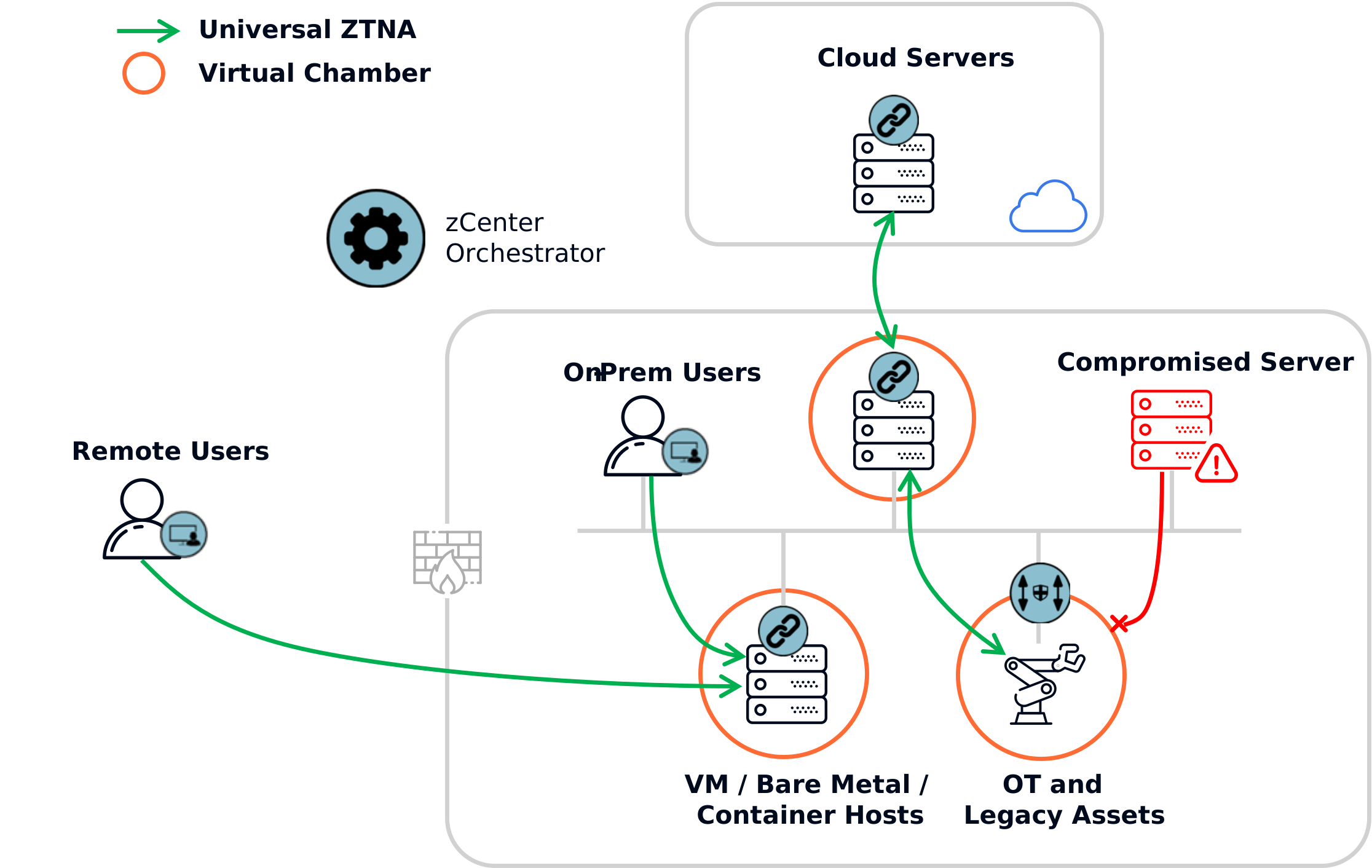
Zentera Zero Trust architecture diagram showing overlay network connecting cloud, on-premises, and edge environments with centralized policy enforcement
zCenter Orchestrator
The zCenter Orchestrator is the central policy engine and manages policy decisions. It integrates with your sources of identity and augments them with identity factors observed by the other system components.
zLink Agents
The zLink agent deploys to the OS and provides full visibility and control over the network.
Zero Trust Gatekeeper
The Zero Trust Gatekeeper deploys inline with assets that need to be protected, but can't accept software agent installation.
Universal ZTNA
Zentera applies the same checks to on-prem users and remote users, keeping assets protected against users who have alternate means of network access.
Secure Remote Access
Zentera provides a range of secure access methods. From RDP and VNC to ssh and standard TCP/UDP applications, remote employees, contractors, and vendors can all access the assets they need without a VPN.
Virtual Chamber
A Virtual Chamber is a logical security perimeter around assets, segmenting them from the network byfiltering out unauthorized packets.
Hybrid Applications
Zentera's unique overlay creates a private network connecting applications running in disconnected networks.
Compromised Servers

Unauthorized accesses are detected and prevented from damaging protected assets.

Core components shown in the diagram:

  • A centralized control plane that manages security policies and user, software, and device identity
  • An overlay data plane that spans cloud (AWS, Azure, GCP), on-premises data centers, and resources in distributed environments
  • Virtual Chambers that enforce Zero Trust segmentation at each resource, even in a flat network
  • Identity-based access controls applied uniformly across all environments

What You Get

  • Powerful microsegmentation for IT and OT with Virtual Chambers
  • Multi-factor, policy-based access control for network connections
  • End-to-end traffic encryption to prevent snooping and spoofing
  • Overlay, software-defined transport that works across cloud, on-premises, and hybrid environments
  • No application changes required for deployment

Details

Where Enforcement Happens

Zentera enforces Zero Trust policies at multiple layers:

  • Network Layer: Identity-based microsegmentation prevents lateral movement
  • Application Layer: Granular access controls that include application identity and process context
  • User Layer: Continuous authentication and authorization against your identity provider (e.g., SAML)
  • Device Layer: Fingerprints and validates security posture of endpoints   
  • Data Layer: Encrypted transport with MITM prevention

This multi-layer approach ensures comprehensive security coverage without gaps.

Traffic Encryption

All communication is encrypted end-to-end using industry-standard protocols:

  • TLS 1.3 point-to-point tunnels between each source and destination
  • Certificate-based mutual TLS (mTLS)

Encryption keys never leave your environment, ensuring complete data sovereignty.

Hybrid and Cross-Domain

Zentera works seamlessly across different environments:

  • Multi-cloud: AWS, Azure, GCP, and other cloud providers
  • On-premises: Traditional data center, lab, and office envionments
  • ICS/OT: Production environments and distributed control points
  • Edge locations: Branch offices, remote sites, and IoT devices
  • Third-party networks: vendor/partner-hosted resources

Zentera's unified control plane enables consistent security policies regardless of where your workloads run.

How It Fits Your Stack

Zentera integrates with your existing technology investments:

  • Works with existing firewalls and security tools
  • Complements SIEM/SOAR platforms with detailed telemetry
  • Integrates with identity providers (AD, Okta, Azure AD, etc.)
  • APIs for automation with CI/CD and IaC tools
  • No application modifications required to deploy network protections

Deploy Zentera without disrupting your current operations or workflows.

Start Small,
Scale Securely

Choose a path that matches your immediate need. Each one delivers quick wins while building toward comprehensive Zero Trust.

Protect your most critical asset without touching the network

The Problem

Your most valuable application sits exposed on a flat network. You're just one breach away from losing everything.

The Move
  • Identify your highest-value app (CRM, billing, IP repository)
  • Deploy Zentera Virtual Chambers to create an invisible security perimeter
  • Only verified users/devices get in; everyone else sees nothing
Timeline

Day 1: Install
Week 1: Protected
Month 1: Proven secure

Success

Your crown jewel is cloaked against attackers, while remaining accessible to users and systems that depend on it.

Rollback

Seamless. Disable the policy or uninstall, and everything reverts instantly.
Ready to pick your first move?

Why Overlay vs. Infrastructure-Based Segmentation

Traditional infrastructure approaches require complex configurations and ongoing maintenance. Zentera's overlay approach simplifies security while delivering superior protection.

The Infrastructure Approach

Traditional segmentation relies on network infrastructure changes:

  • Requires firewall rule modifications
  • Requires reorganizing application subnets and changing IPs
  • Involves VLAN reconfigurations
  • Needs ACL updates across multiple devices
  • Demands constant network team involvement
  • Creates security gaps during transitions
  • Scales poorly with cloud adoption

The Overlay Approach

Zentera's overlay sits above your infrastructure, enabling:

  • Zero infrastructure changes required
  • Software-defined security policies
  • Instant policy deployment
  • Rollback for complete operational flexibility
  • Self-service for application teams
  • Consistent security across all environments
  • Built for multi-cloud and hybrid architectures
Deploy in hours, not months. No network disruption required.

Choose Your Enforcement Model

Each model has different trade-offs. Pick based on what you're protecting and what's operationally easiest.

zlink2

zLink Agent

Host-based enforcement for workloads you control

Show details
What It Does
Enforces the Virtual Chamber, enables access, and provides full visibility and context on the host itself, at the OS network layer

Best For
  • Servers and VMs you own and manage
  • Containerized workloads
  • Cloud instances (EC2, Azure VMs, GCE)
  • Windows (XP and up), Linux (kernel version 2.6.32 and up), and MacOS
Not For
  • Unsupported operating systems
  • Legacy systems where compliance prevents software installation
  • OT/IoT devices where software installation is not possible
What Changes
  • Install lightweight agent (~50MB, no reboot)
  • Agent connects to zCenter control plane
What Stays the Same
  • Your applications - no code changes
  • Your network - no firewall rules
  • Your existing security tools
icon-zig

Zero Trust Gatekeeper

Inline Zero Trust enforcement for ICS/OT workloads

Show details
What It Does
Enforces Zero Trust identity and authorization checks in the network and at the OT device edge

Best For
  • Mission critical assets (SCADA, PLC)
  • Protecting individual devices (full segmentation) or subnets of devices (production line)
  • Workloads with high availability requirements (hardware bypass)
Not For
  • ICS/OT devices that can deploy an agent (e.g., HMI - the zLink agent is better)


What Changes
  • Deploy ZTG in wiring closet or on production floor
  • Plug in ZTG between the device and the switch
What Stays the Same
  • Your internal network - ZTG is transparent at Layer 2
  • Your application reliability- supports your existing HSR/PRP redundancy
  • User experience - after users authenticate, their use flow stays the same
edge gateway

Gateway Proxy

Network-level enforcement without touching endpoints

Show details
What It Does
On-ramp/off-ramp to Zentera CoIP transport for easy remote access

Best For
  • Systems that can't run the zLink agent
  • Replacing VPN functionality with ZTNA
  • Reflecting a remote service into another environment(e.g., connect to a private API gateway without exposing a public IP)
Not For
  • Highly distributed workloads (agents scale better)
  • Segmentation (Gateway Proxy only filters remote traffic)
  • Scenarios needing per-process visibility
What Changes
  • Deploy gateway appliance (VM)
  • Gateway proxies remote traffic to/from the local network
What Stays the Same
  • Your endpoints - no software installed
  • Your applications - no modifications
  • Your legacy systems - untouched

Policy Model: What You'll Actually Configure

Policies are identity-based. You define the who and what (identities), the how (applications, ports), and what (allow/deny). No code required.

Policy Inputs

What are the inputs to a policy decision?

  • User attributes (role/identity)
  • Device posture (OS version, EDR status)
  • Target resource (identity)
  • Application metadata (cryptographic identity, digital signature)
  • Context signals (process owner, process tree)

Policy Outputs

What actions does the policy take?

  • Allow/Deny access
  • Use encrypted transport for application traffic
  • Trigger alerts or log events for compliance

Policy Lifecycle

  • Review policies Zentera suggests based on the observed traffic
  • Draft policies and validate against the observed traffic
  • Publish policies to production
  • Monitor policy effectiveness
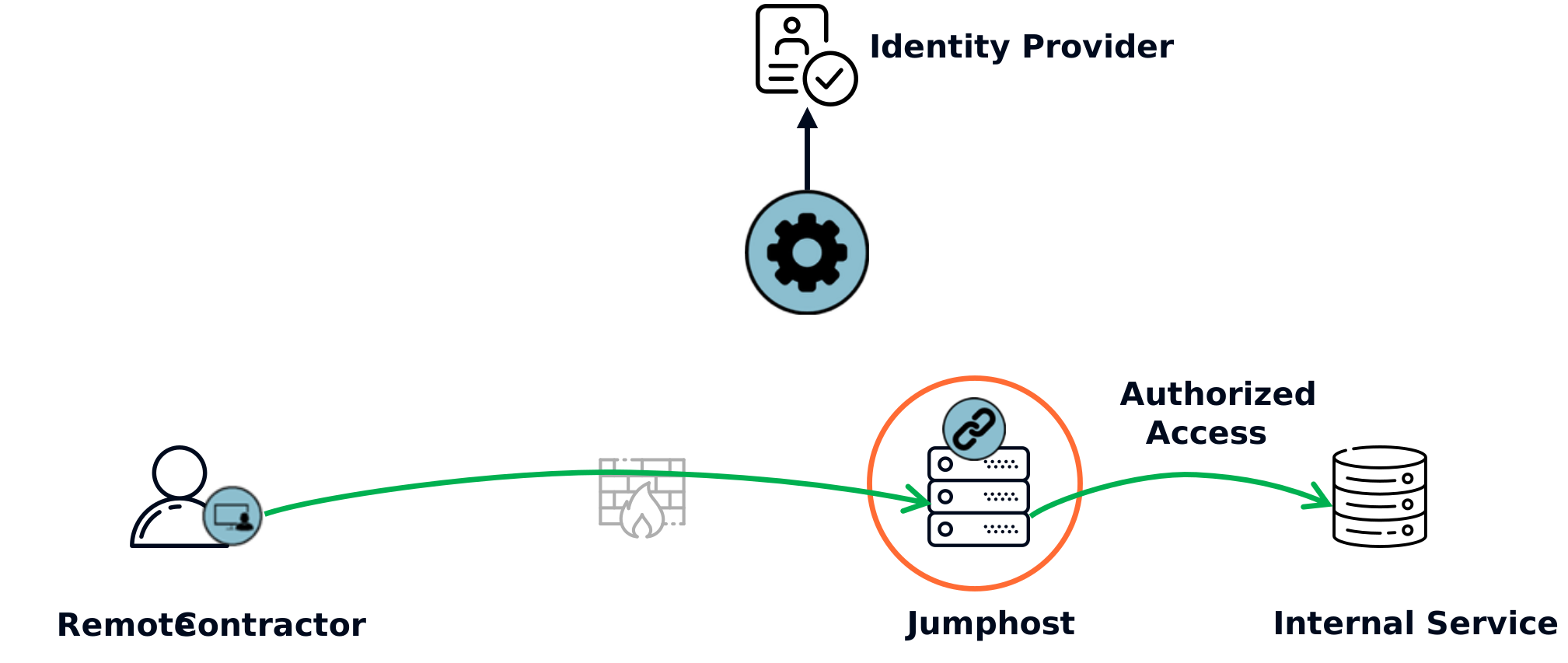
Example: Contractor Access to RDP Jumphost

contractor access


On the  RDP jumphost:  

  • Allow users with authenticated by corporate IdP and possessing the Contractor role to access the jumphost using the Microsoft RDP application
  • Allow the jumphost to access specific backend services (e.g., building automation controls) using approved clients (e.g., browser)
  • Allow the jumphost to access to shared services such as NTP and DNS
  • Deny all other traffic to/from the jumphost

This policy set allows contractors to log in to the jumphost, but never opens the RDP port (TCP/3389), instead carrying known-good RDP traffic through overlay transport. It allows contractors to do their job, but no more - the default deny behavior prevents other potential abuses.

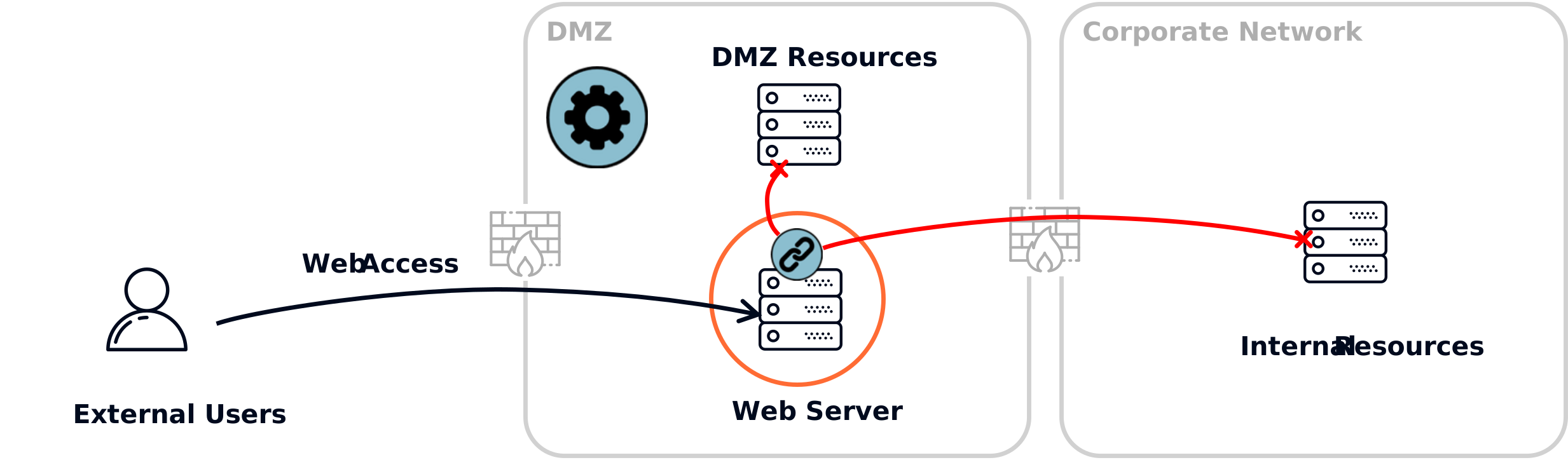
Example: Internet-Facing Web Server

web server


On the web server: 

  • Allow access from the Internet on web ports
  • Allow the web application to access to a backend database
  • Allow access to shared services such as NTP and DNS
  • Allow ssh access for users with the Web Server Admin role
  • Deny all other traffic

This policy set allows the server to function normally, but prevents exploits like web shells from resulting in lateral migration to other DMZ or internal servers.

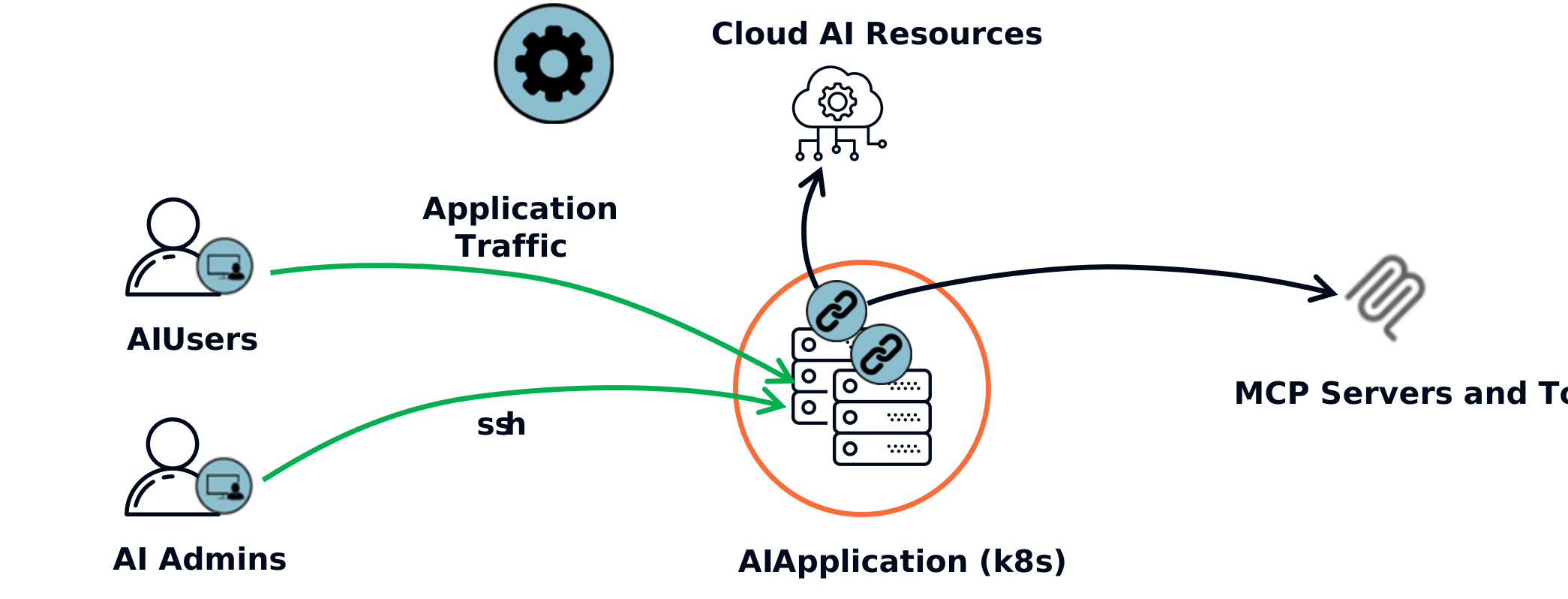
Example: Kubernetes AI Application Protection

k8s AI


On the AI application node : 

  • Allow users with AI User role to access AI application ports (ZTNA)
  • Allow the AI application to access approved MCP servers and other tools
  • Allow access to shared services such as NTP and DNS
  • Allow ssh access for users with the AI Application Admin role
  • Deny all other traffic

This policy set exposes the AI application for users and ssh access for the admins without opening either port 443 or port 22 on the local network. It gives Infosec visibility and control over what tools AI agents are allowed to access, and blocks all potential abuse by default.

The Operational Reality

The questions architects and directors actually ask before signing off

Downtime required?

Typically zero downtime. Zentera deploys as an overlay: no rip-and-replace. Enforcement points install alongside existing infrastructure. No reboot is required when installing agents, minimizing maintenance windows. 

Network changes needed?

None. No firewall rule changes, no VLAN reconfigurations, no IP reorganization. Your network stays exactly as it is.

How does rollback work?

Instant and complete. Disable the overlay, and traffic flows exactly as before. No cleanup, no residual configurations, no dependencies to untangle.

Who owns what?

You own the policies and data. You own and manage the control plane (zCenter). You define access rules, own all logs, and control key management. The policies are basic and fundamental to your organization, and can be ported to other systems.

What are the failure modes?

Fail-open or fail-closed: it's your choice. If an enforcement point loses connectivity, you configure the behavior: prioritize availability (fail-open) or block until reconnected (fail-closed). Control plane outages don't break established connections.

Is this yet another service dependency?

No. Our customers typically deploy on-prem for ultimate control over service availability, system maintenance and upgrades.

Check out our CoIP Platform overview for details on the system components.

Proven Results

See what industry leaders say about Zentera

Pick Your Next Step

Choose how you'd like to move forward with securing your network

Get a 30-Day Rollout Plan

Work with our team to create a customized deployment strategy for your organization

No commitment required

Book an Architecture Review

Get expert analysis of your current network setup and security requirements

Complimentary for qualified organizations