In chip design and pharma R&D, AI agents now read source code, run tools, and query internal systems for hours with no one watching each step. The data they touch is the company's core IP.
 In June, NVIDIA published How to Govern Autonomous Agents in Enterprise AI Factories, a practical guide to containing these agents with its Secure Agent Workspace Reference Design. The design treats the user's laptop, browser, or terminal as a presentation layer only. Agents run in a managed workspace, where identity, network access, credentials, runtime policy, and audit are enforced in one place.
We agree with this design, and it can be implemented now. This post follows NVIDIA's two phases and shows how Zentera's CoIP Platform and Ensage AI deliver the main recommendations. In two areas, lateral movement between projects and the choice of inference provider, we extend the guidance.
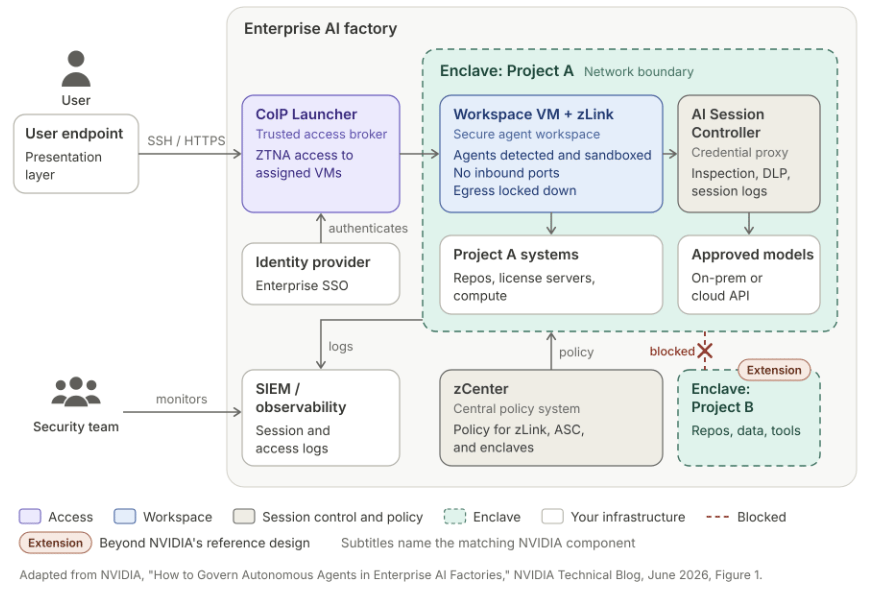 Figure 1. Where Zentera fits in NVIDIA's Secure Agent Workspace. Each project runs in its own enclave, and other projects are not reachable.
Managed workspaces behind SSO
NVIDIA's first phase gives every user a company-managed VM and puts a trusted access broker in front of it. Users sign in with enterprise SSO, every session is auditable, and no agent work runs on the endpoint.
CoIP Launcher, part of Zentera's zero trust network access (ZTNA) service, is that broker. Users sign in through the corporate identity provider and open a remote desktop, SSH, or web session to their assigned VM. Nothing needs to be installed on the user's device. Access is granted per user and per VM, and every session is logged.
zLink, Zentera software that runs in the workspace, cloaks the VM. It exposes no open inbound ports, and only authorized sessions can reach it. The VM's outbound side is locked down too, so the workspace cannot become a path for moving data out of the enterprise.
The network: default deny, and no wandering between projects
NVIDIA's first phase also blocks all internet traffic by default and allows only approved services. We agree, and internal traffic needs the same attention.
An agent with broad internal reach can move between projects, and it does not have to be compromised to do so. A compromised agent can stage data through another project's systems to hide exfiltration. A well-behaved agent can do the same thing while trying to solve a problem. Stuck on a timing issue, it searches a neighboring project and borrows a fix from another customer's design. No attacker was involved, but a customer confidentiality agreement was just violated. A pharma team running programs for several partners faces the same risk.
The Enclave handles both cases. An enclave maps to a project. Resources outside an enclave are not reachable from inside it, and enclave resources are not reachable from outside it.
R&D teams define what belongs in each enclave: the repositories, license servers, compute, and people for that project. An agent assigned to the enclave can reach those resources and nothing else. Teams can add an agent to an enclave when its task begins and remove it when the task ends. That keeps agent access bounded and revocable, which is the stated goal of NVIDIA's first phase. Enclaves are also a practical way to enforce the allowed services and data scope that NVIDIA's agent blueprints define.
Runtime security for every agent, sanctioned or not
NVIDIA's second phase moves controls inside the VM, to the point where an agent reads a file, runs a command, or calls a service. It recommends running agents in an active sandbox such as NVIDIA OpenShell, with policy defined in a central system.
OpenShell is a good runtime for agents built to use it. A real R&D workspace also holds agents that were not. A developer installs a coding assistant. An EDA or lab software vendor ships an agent inside its tool. A script starts calling a model API. These shadow AI and third-party agents often do not support OpenShell yet.
Ensage covers both cases. zLink detects every AI agent in the workspace by process fingerprint and network behavior, with no cooperation from the agent. Each agent it finds is placed in a sandbox. Ensage works alongside OpenShell, and it does not depend on it.
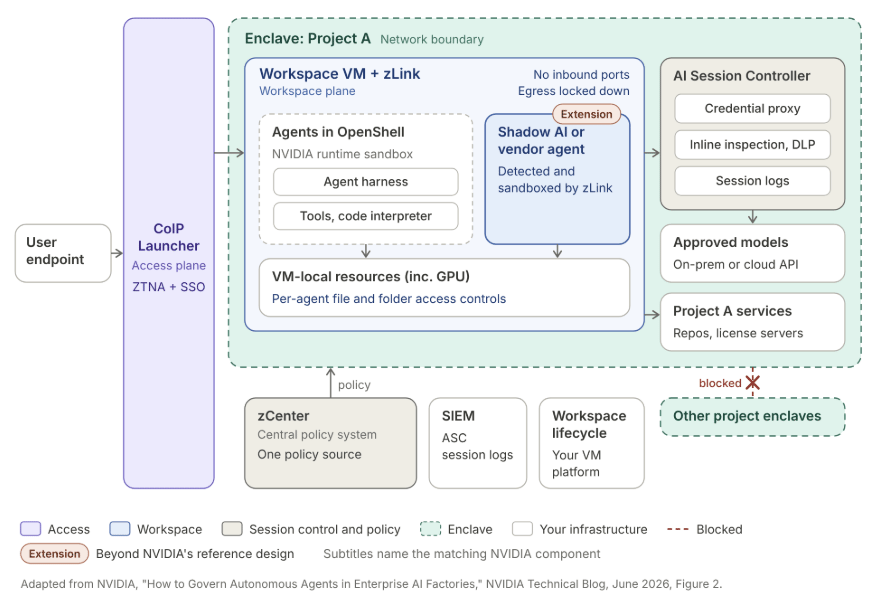
Figure 2. Inside the workspace. zLink sandboxes agents whether or not they run in OpenShell, and AI traffic passes through the AI Session Controller.
Inside the sandbox, data access controls specify which files and folders each agent may access. An agent working on one block of a chip design does not need the rest of the repository, and policy can say so.
The runtime controls pair with the AI Session Controller (ASC), a TLS-terminating proxy that runs inside the customer's environment. The ASC inspects agent sessions inline, including prompts, responses, and tool calls. It applies DLP policy to what agents send to models and logs every session. This is where policy decides whether design source or study data may go to an outside model. The sandbox, the file controls, and the ASC share one policy source, which serves as the central policy system NVIDIA describes.
Secrets: the agent never holds the real key
NVIDIA says not to store passwords or keys in the workspace. Agents should work through a credential proxy so they never see raw secrets.
The ASC does this for AI credentials. Agents hold substitute credentials, and the ASC injects the real key at the enforcement point. No enterprise AI credential remains in the workspace for a compromised or prompt-injected agent to steal. A substitute credential copied out of the workspace does not work against the provider directly. Keys are held in one place, so rotating or revoking one does not mean touching every workspace.
Inference: approved providers only
NVIDIA's agent blueprints route inference through a gateway that manages quotas, access control, and rate limits. For many R&D teams, an earlier question is which providers a project may use at all.
The Enclave answers that per project, alongside the gateway. A sensitive design program can be limited to an on-prem model, or to a model running locally in the workspace. A less sensitive project can use an approved cloud provider. The rule is enforced at the enclave boundary, so an agent cannot get around it by calling a different endpoint.
NVIDIA's guidance, mapped to Zentera
| NVIDIA recommendation | How Zentera implements it |
|---|---|
| I Perimeter Secure the perimeter outside the VM | |
| Managed VM per user; no agent work on the endpoint | Your workspace VMs, cloaked by zLink and locked down against exfiltration zLink |
| SSO login gate and trusted access broker | CoIP Launcher ZTNA with enterprise SSO CoIP Launcher |
| Default-deny network | Enclave: default deny, with each project as its own policy boundary and no reach between projects Enclave Extension |
| Centralized logging | ASC logs every agent session; CoIP Platform logs every access session AI Session Controller |
| II Runtime Add runtime security inside the VM | |
| Active sandboxing | zLink detects AI agents in the workspace, including ones not launched in OpenShell, and sandboxes them zLink Extension |
| Central policy for what an agent can do | One policy source for sandboxes, file and folder access, and ASC DLP zCenter |
| Credential proxy | ASC credential substitution for AI provider keys AI Session Controller |
| BP Agent blueprints Integrate workflows into the workspace | |
| Inference gateway | Enclave limits each project to approved providers, alongside the gateway Enclave Extension |
R&D teams do not need to wait for every agent to support a new runtime before adopting NVIDIA's design.
If you are planning agent workspaces for a design or research team, talk to us about how this maps to your environment.